

In today’s data-driven world, visualizing insights is only half the battle. The real power lies in acting on those insights instantly—and that’s where Power Automate steps in to elevate your Power BI experience. By integrating Power Automate with Power BI, organizations can automate workflows, trigger actions based on data conditions, and create seamless business processes—all from within a report.
What Is Power Automate?
Power Automate is Microsoft’s workflow automation tool that connects hundreds of services and apps. It allows users to:
- Automate repetitive tasks
- Trigger actions based on events
- Connect data across platforms like SharePoint, Outlook, Teams, and Power BI
How Power Automate Enhances Power BI?
Here’s how Power Automate takes Power BI from passive reporting to active decision-making:
1. Trigger Actions from Reports
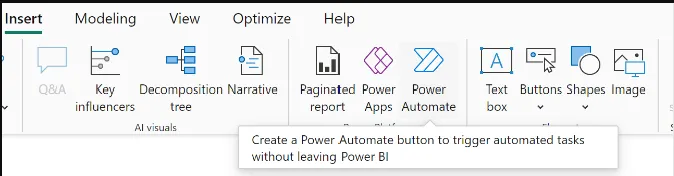
Using the Power Automate visual, users can:
- Send emails or Teams messages directly from a report
- Update Excel or SharePoint lists with filtered data
- Trigger approval workflows based on selected visuals
Example: A manager clicks a button in a report to approve budget requests filtered by department.
2. Automate Report Distribution
Set up flows to:
- Email paginated reports on a schedule
- Export filtered visuals to PDF or Excel
- Share insights with stakeholders automatically
Example: Every Friday, a sales report is emailed to regional heads with their specific data slice.

3. Respond to Data Alerts
Power BI can trigger flows when:
- KPIs cross thresholds
- Data anomalies are detected
- Specific conditions are met
Example: If inventory drops below a critical level, Power Automate sends a restock alert to procurement.

4. Refresh Datasets and Dataflows
Use flows to:
- Refresh datasets on demand or schedule
- Chain refreshes across multiple sources
- Notify users when refreshes complete or fail
Example: After a SharePoint file is updated, Power Automate refreshes the connected Power BI dataset.

Common Power BI + Power Automate Use Cases
| Use Case | Flow Type | Trigger Source |
| Send filtered report via email | Instant Flow | Power BI button |
| Approve expense requests | Automated Flow | Power BI data alert |
| Refresh dataset after file update | Automated Flow | SharePoint trigger |
| Notify team of KPI breach | Automated Flow | Power BI alert |
| Export report to OneDrive | Scheduled Flow | Time-based trigger |
Real-World Impact
- Marketing Teams: Trigger campaign follow-ups based on lead scores.
- Finance Departments: Automate budget approvals and audit logs.
- Operations: Alert teams when delivery metrics fall below SLA.
- HR: Send onboarding checklists when new hires are added to a dataset.
Final Thoughts
Power BI tells you what’s happening. Power Automate helps you do something about it—instantly, intelligently, and at scale. Together, they create a feedback loop where data drives action, and action feeds back into data. It’s not just reporting—it’s responsive analytics.


